Working with Pega
On this page
Connection and versions
Connect to Pega uses the DX API v2 (
/api/application/v2). It goes through the studio's relay (online: only to the Pega server registered for your account, see The online studio; locally: the dev server's proxy), so Pega needs no CORS entry for the studio.Pega version: each connection has a version, 25.1 or 26.1. It decides:
- which runner opens (online
constellation-runner-25or-26.vercel.app; locally port 3502 or 3503); - which DX Component Builder bundles your components (on the studio's server);
- which Cosmos version the preview uses.
- which runner opens (online
Two operators:
- The studio calls Pega as the operator behind its confidential OAuth client (client credentials).
- The runner signs in as a real user with the public client (authorization code + PKCE).
Their worklists and rights can differ.
Expired token: if a client-credentials token expires during a session (often after an hour), the studio signs in again once and repeats the call. This only works while the settings are unchanged and the secret is available in the tab.
Run in Pega
Run in Pega opens the runner, the official React SDK, for your Pega version. Its address must be a redirect URI of the public OAuth client (see Pega-side setup):
It signs in on Pega's own page, creates or opens a case, and renders it.
Fields follow your design's library and theme, using your design's look.
Studio-published templates are drawn by the runner from your design.
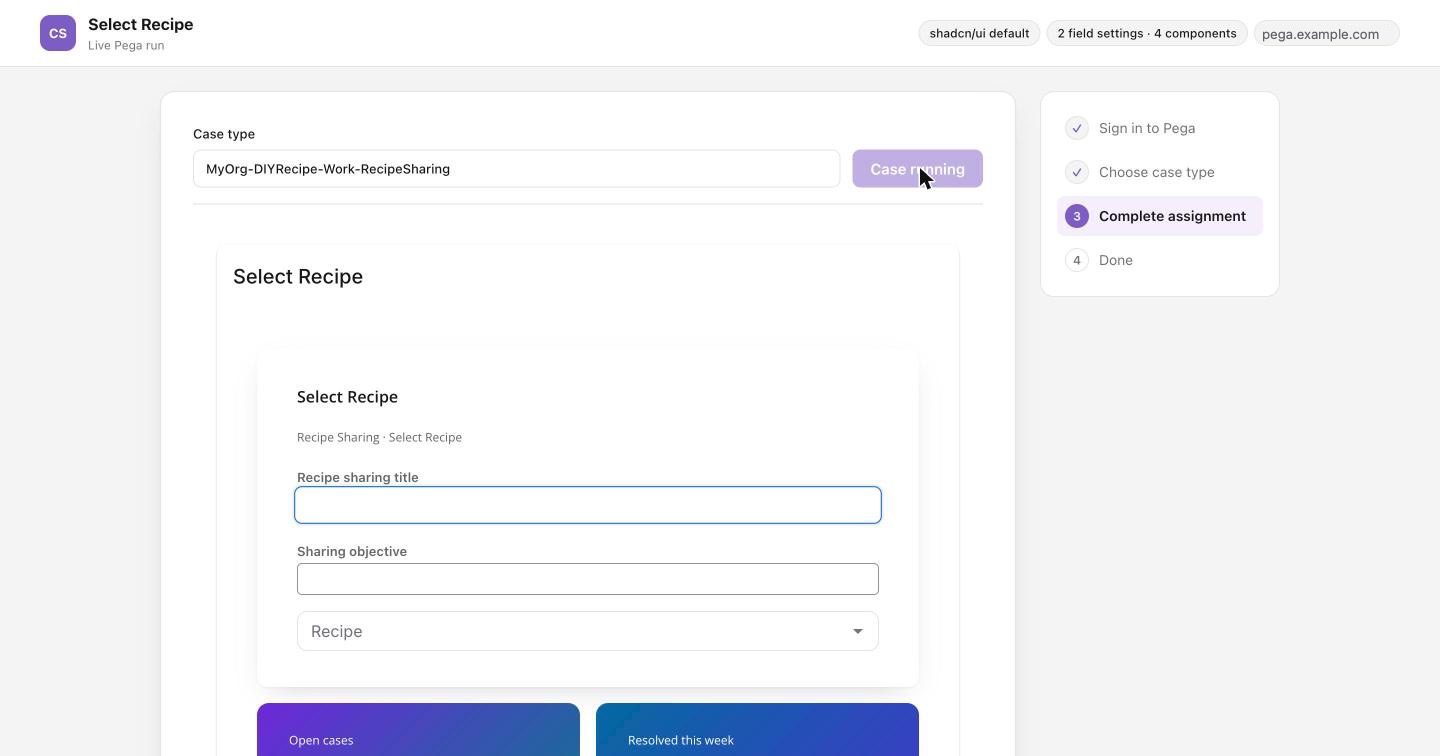
The design's layout on a step. When a step's form fits the design, the step is drawn as the design: headings, KPIs, tables, alerts and every other component sit where they are on the canvas, and the design's fields are bound to the case (values are saved by Pega's Next/Submit like any field). A step fits when:
- every field of the design is an editable field of the step (so nothing you type is lost), and
- the step's other fields have a place: add a Pega region to the design and Pega draws them there (for example a case-reference picker the recording did not capture). Without a region, the design must hold every field of the step.
Any other step (read-only fields, a design field the step does not have, a design with nothing but fields) keeps Pega's own form, with the design's other components below it under "Design components". Bound data loads live, and
@Pparameters read the open case.
Publish to Pega (form templates)
Step by step, how to use each kind in App Studio, and good practice: Publishing components.
Publish to Pega turns the design into a Constellation FORM template (<Org>_<Library>_<Name>). The dev server
bundles it with the DX Component Builder and posts it to PRRestService/dev/v1/publish_component.
- Fields: by default (Pega fields) each field gets its own region, where you place the property in App Studio and configure it with Pega's gear; the template draws it where the design has it. Set up in Pega can place them for you. The older mode (fields drawn by the template) binds them through template settings instead. See Publishing → Pega fields.
- Bound data components: they are embedded live (
getDataAsync). Each is also published as its own PAGE/CASE widget. - Companions: range sliders, timelines and gauges get their own companion components.
- Ruleset: it must be unlocked and in the application stack. The operator needs publish rights.
- Detected failures: the studio now treats a 200 answer that reports a failure in its body, such as a locked ruleset, as an error.
- Using it: in App Studio, open the view (for example the step's flow action view), choose Edit, and pick the template. Save a copy of the view first.
- Stale versions: Pega keeps the component's
?v=address across republishes. To see a new version, reload with the cache disabled or open a fresh Pega session.
Export as a DX component
A single field, a group of fields, or a static group can be packaged as a standard Pega Field, FORM template or Widget,
compatible with @pega/custom-dx-components. The package includes:
- a mock;
- Storybook stories;
- a test;
- docs.
Data pages
- Querying: list data pages are queried with
POST data_views/{ID}(select, filter, sort, paging); page data pages withGET. A table inserted from the workbench keeps the columns you chose (Pega'spxObjClassand other system fields are left out). - Rights: data pages must be enabled for API access, and the operator's access group needs
PegaRULES:PegaAPI. - Saving records: savable data pages save records through
data/{ID}. See the DX API page.
Pega suggestions
After Connect, the studio reads (read-only):
- each case type's list data page metadata;
- each case type's create form;
- standard data pages such as
D_pyMyWorkList,D_pyWorkHistoryandD_OperatorID.
From these it suggests property and data page names in the editor. They are kept per server in the browser.